
Probe configuration
Configure protocol, deadlines, packet size, and source per target.
Select a live target and click Configure Probe. For a new target, select + or New Target first. The dialog stages edits privately until you apply them.
- Apply saves the configuration and keeps the dialog open.
- Save saves the configuration and closes the dialog.
- Cancel discards edits made since the last successful apply.
Saved configuration takes effect in the next measurement round. Existing saved history is preserved. Historical sessions cannot be edited through this dialog.
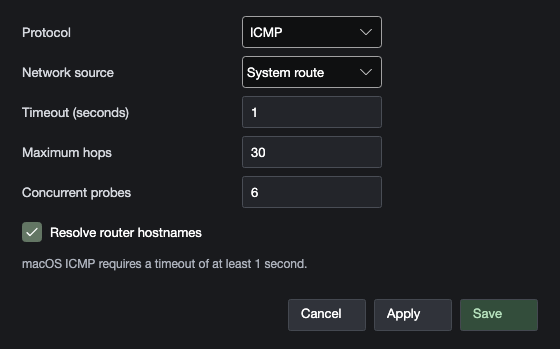
Supported settings
These are initial defaults; restored workspaces, previous choices, profiles, or Monitoring settings can change the values you see.
| Setting | Initial default | Supported values / behavior |
|---|---|---|
| Protocol | ICMP | ICMP, TCP, UDP |
| TCP destination port | 443 | 1–65535 |
| UDP destination / start port | 33434 | 1–65535 |
| UDP port mode | Fixed port | Fixed port or sequential inclusive range |
| UDP ending port | 33625 | 1–65535; cannot be below the starting port for a range |
| UDP packet size | 56 bytes | 56–65535 bytes total, including IP and UDP headers |
| Allow IP fragmentation | Off | Permits IPv4 fragmentation where supported |
| Network source | System route | Available interface / local source address |
| Timeout | 1 second | 0.1–30 seconds; macOS ICMP minimum 1 second |
| Maximum hops | 30 | 1–64 TTL/hop-limit positions |
| Concurrent probes | 6 | 1–32 outstanding probes per target round |
| Resolve router hostnames | On | Look up names for responding router addresses |
Sampling interval
The main toolbar's Interval control offers 500 ms, 1 second, 2.5 seconds, 5 seconds, and 10 seconds. The initial interval is 2.5 seconds. Monitoring defaults and probing profiles can also store intervals; the configuration model accepts 0.1 seconds through 1 hour.
The interval is the intended measurement-round cadence, not a promise that every probe completes within that time. If discovery and endpoint probing take longer than the interval, Pngr finishes the round before starting the next. Increase the interval, shorten a suitable timeout, or reduce discovery work if rounds cannot keep up.
Choosing values
Use the default settings for a baseline, then change one relevant value at a time:
- Raise the timeout if valid responses arrive too late for the current deadline.
- Increase maximum hops if discovery stops before reaching the destination.
- Use a fixed UDP port when comparing one flow; use a range when exploring port-dependent paths.
- Use larger UDP packets only when investigating packet-size or MTU behavior. Fragmentation and network limits can change the result.
- Select a source only when you need to test a particular local interface. A saved source can become unavailable after a network change.
The maximum-hop setting limits positions probed. An unanswered position is not a confirmed router. See understanding network hops.